
 Back
Back
Last Updated: 10/15/2024
Last Updated: 10/15/2024

Note: We no longer recommend using either of these devices for digital signage. The Google Chromebit will no longer be receiving software updates and recent software updates to Fire TV Sticks made them much harder to use. As of 2024, we point customers to the Chromecast with Google TV when purchasing a budget media player.
But if you've already purchased the Google Chromebit and are looking to see how the Amazon Fire TV Stick 4K compares to it, then here's everything you need to know.
Digital Signage Hardware: The Amazon Fire TV Stick & Google Chromebit
Which of the many low-cost digital media players currently available is best for digital signage? Customers ask us that all the time. In this comparison, we'll look at two popular options: the Amazon Fire TV Stick 4K and the Google Chromebit, comparing all of their pros, cons, and superpowers to give you a rounded view.
UPDATE: As of September 2024 the Amazon Signage Stick is the go-to option for Amazon based digital signage.
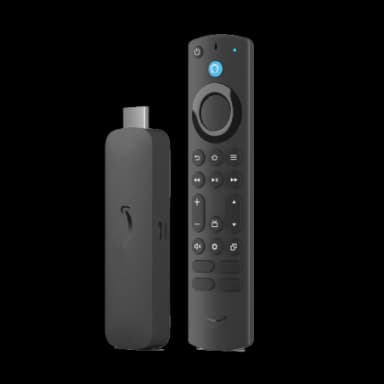
Amazon Fire TV Stick 4K
For a thorough review of Amazon's HDMI sticks, read our detailed guide about what they are, how they work, and how to set one up. In short, a Fire TV Stick is a small, ~$50 device that can connect to the internet, download apps (like the ScreenCloud Player) from Amazon's app store, and show content from those apps on your TV. They were an excellent option for budget digital signage hardware for a long time. However, recent operating system updates have made them much less capable.
Google Chromebit
The Google Chromebit (in-depth review here) is a similar device that plugs into your TV or computer via a HDMI port. It’s sometimes called a “PC stick” as it runs Chrome OS. It can be bought on Amazon for around $85.
Which is better for digital signage?
Neither device is a great option compared to something like the Chromecast with Google TV or Station P1 Pro. However, current-generation Fire TV Sticks are far and away better than the Chromebit. Google's no-longer-supported PC sticks cannot support 4k and are unusable for many up-to-date apps in the Play Store.
If you already have the Chromebit and are looking to purchase a new device like the Amazon Fire TV Stick 4K, here's a digital signage led comparison of the two:
Setup
Both devices are “plug and play” which means they’re both pretty easy to install. To use, you’ll need to plug the device into the HDMI port of your screen, plug in the power adaptor and connect to WiFi.
As you’d expect, you need an Amazon account to set up the Amazon Fire TV Stick 4K and a Google account to set up the Chromebit.
The Amazon TV Stick 4K also has Alexa built into its latest version, so if you prefer voice control, this can be a nice addition.
It's also worth noting that when the Amazon Fire TV Stick 4K launches or reboots the screen will always load the Amazon Home screen first with the other apps that Amazon is featuring before automatically loading ScreenCloud. With the Chromebit, the load process is ChromeOS first then straight into ScreenCloud so it can make for a slightly faster setup if you've had to restart the screen.
Price
The TV stick is slightly cheaper than the Chromebit, so if you’re budget conscious, or you need to buy multiple devices now or in the future, the TV stick is around $45 cheaper per device. If you wait until Prime Day, you can also get various discounts on the TV stick which makes bulk buying a dream.
Power
The Amazon Fire TV Stick 4K runs well with ScreenCloud but it isn’t as powerful as the Chromebit. As you’ll see below, the Chromebit has more RAM and double the storage of the Fire TV Stick, despite being of a similar physical size.
Although it is important to note that the Fire TV Stick has 4K resolution capabilities whereas the Chromebit only supports HD.
Tech spec of the Google Chromebit vs the Amazon Fire TV Stick*
*note this is based on the 2nd gen Amazon Fire TV Stick 4K

Usage
If you’re using less than five screens in your digital signage strategy, the Amazon Fire TV Stick might be a passable solution. If you’re running more than that, the purpose-built Station P1 Pro is probably your best bet.
It’s also good to know that the Amazon Fire TV Stick does not support proxy networks, except via side loading which is not intuitive. If you’re looking to apply custom network settings for your digital signage it’s better to use the Chromebit, where you can setup your network settings under CDM. To find out how to do that, head here.
Connectivity
As the Chromebit can be managed remotely using CDM, it’s a better device if you aren’t going to be able to access your screens. If something does go wrong, you can log in and remotely manage or reboot the screens in question. With the Fire TV Stick, you’ll need to be with the screen in order to reboot the device which is kinda tricky if, like some of our clients, your screens are out on a barge in the middle of the Ocean.
Summary - which device is for you?
To summarize, here are the key benefits of each device:

For further questions on the two devices, contact our knowledgeable team on support@screencloud.com.